Apogiosi VST-Plugin
APOGIOSI — Raise the Energy. Release the Impact.
Riser, Downlifter & Build-Up Generator
Turn a held MIDI note into a transition that moves your track forward.
Introducing APOGIOSI by HighLife Samples, a creative instrument plugin that combines accelerating rhythms, evolving pitch, and sweeping noise in one intuitive interface.
From rolling snare builds and rising synth textures to descending effects and rhythmic transitions, APOGIOSI helps you shape the energy around your next drop. Draw your movement, build a pattern, and blend three independent sound layers—all synchronized to your project tempo.
Three Layers. One Powerful Build.
Create your transition from a single layer or combine all three for a fuller sound.
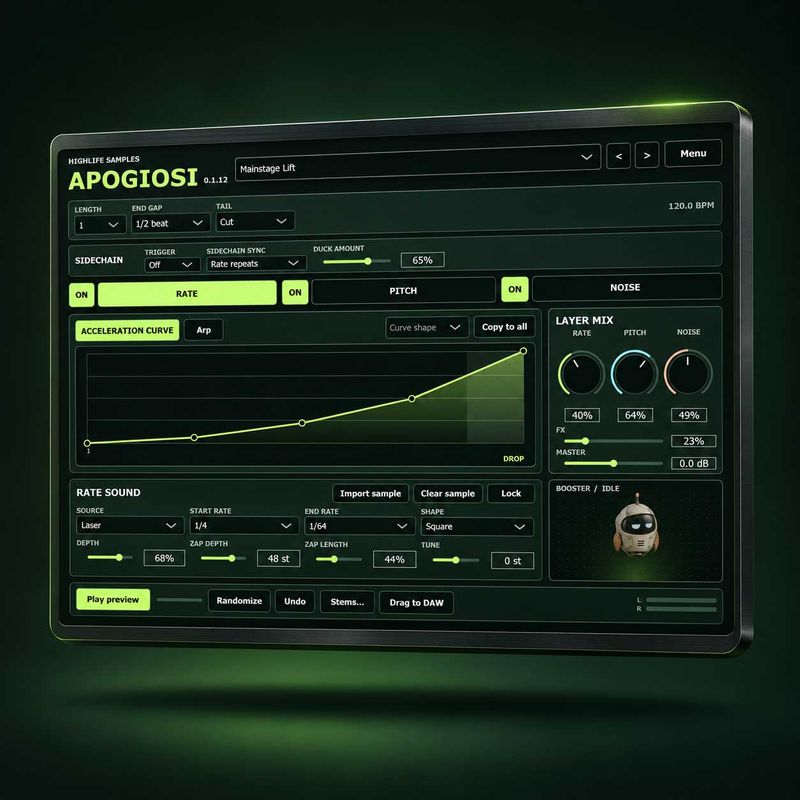
- RATE: Build accelerating rhythms with sources including snare, saw chord, blip, noise, and laser—or import your own sample.
- PITCH: Create rising and falling tones with sounds including supersaw, strings, hoover, vocal, and FM bell.
- NOISE: Add movement and atmosphere with evolving filter sweeps, resonance, and stereo width.
Use the dedicated Layer Mix controls to balance each element, then shape the final sound with FX, Clip Drive, and Master level.
Draw the Movement
Take control of how your build develops with editable acceleration curves.
Start gently, increase the pressure in the final bars, or create a descending transition. Double-click the curve to add points, then drag them into position to shape the movement.
Each layer has its own curve. Use Copy to all when you want the layers to follow the same shape while keeping their individual sound settings.
Choose the phrase length, leave an End gap before the drop, and decide whether the effect should cut cleanly or ring out.
Add Rhythm with Arp
Give your transitions a groove with the built-in Arp sequencer.
Choose the playback mode, octave range, speed, gate, pattern length, and shuffle. Edit individual steps and see their exact semitone offsets as you work.
Double-click a step to mute or restore it, creating gaps and rhythmic variations. The pattern controls all three sound layers, helping you turn a straightforward rise into a more animated build.
Make It Your Own
Import your own audio into the Rate layer to create transitions from custom snares, percussion, textures, or sound effects.
Use Randomize to explore new sound combinations and acceleration curves while preserving your Arp pattern and phrase timing. Lock the layers you want to keep, then continue experimenting.
Add internal ducking with Sidechain Sync, following Rate repeats or musical divisions of 1/1, 1/2, 1/4, and 1/8.
32 Factory Presets
Find a starting point with 32 factory instrument presets, covering uplifters, downlifters, snare builds, and evolving textures.
Explore sounds such as Mainstage Lift, Snare Pressure, Uplifter – Skyline, and Downlifter – White Horizon, then customize them for your track.
Browse with the preset arrows and save your own settings for future projects.
From Plugin to Arrangement
Keep your transition inside APOGIOSI or turn it into audio for further production.
- Export a combined mix.
- Export separate Rate, Pitch, and Noise stems.
- Export an individual layer.
- Drag rendered audio directly into your DAW.
Audible exports are peak-normalized to 0 dBFS and saved as stereo 24-bit, 48 kHz WAV files.
APOGIOSI MIDI Included
Use the separate APOGIOSI MIDI edition to create pitch sweeps, accelerating note repeats, and Arp patterns with a compatible synth of your choice, like Serum, Sylenth, Spire, Nexus and more.
Your receiving synth supplies the sound. For pitch sweeps, it must support MIDI pitch bend, with its bend range matched to APOGIOSI MIDI.
Additional Features
- Animated Booster character that responds as the build develops
- Resizable Signal Rack interface
- Independent layer switches and Randomize locks
- User preset saving and loading
- Built-in Producer Tips
- Optional hover explanations and animation
- DAW automation and session recall
- Offline license activation
Windows and Mac Compatibility
| Platform | Requirements | Plugin formats |
|---|---|---|
| Windows | Windows 10 or newer, 64-bit, with a compatible DAW | VST3 |
| Mac | macOS 11 or newer, with a compatible DAW | VST3 and Audio Units |
The universal Mac build supports Apple Silicon and Intel. Both platform installers include APOGIOSI and APOGIOSI MIDI.
Installation and Activation
Close your DAW before installing, then reopen it and re-scan plugins if needed.
The activation window appears automatically when you first open an unactivated plugin. Paste your 88-character license code beginning with HLS to unlock it.
The same code works on Windows and Mac, with activation saved separately on each operating system. The instrument and MIDI editions share activation within the same user account.